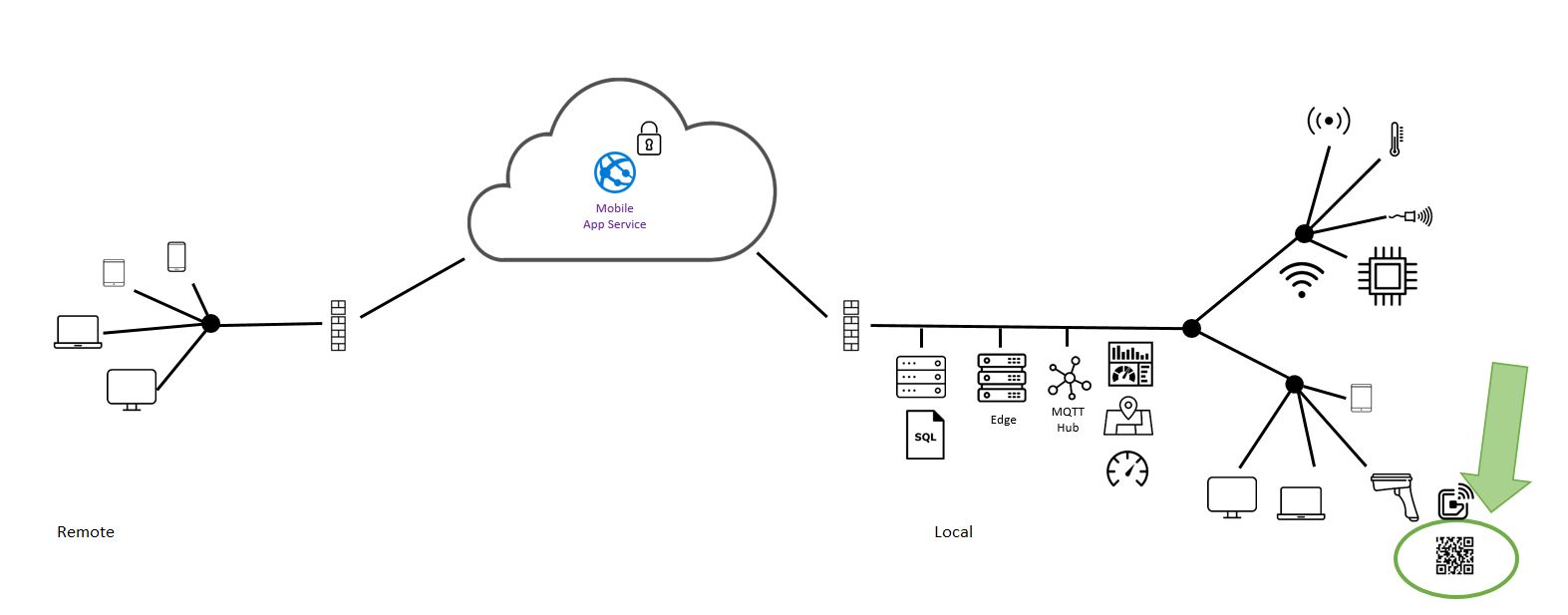
Industry 4.0 prototyping, Devices

Non Android devices play an important role in the communication flow of data from labels/sensors through to functions and storage.

There are 100’s of development board devices available. Each device has a production chip-set with basic accessories to get a prototype started, such as USB, Wi-Fi and pin connections to other things which is why they are big. The device often plugs into other boards that have even more accessories e.g. Bluetooth, GPS, GSM.

Over time the devices have improved with better chips-sets and more accessories that are tightly integrated to make things easier. Chip-set manufacturer Espressif has these two generations, ESP8266 and the newer ESP32. Both chip-sets are available in many development boards. ESP8266 is $2~16, ESP32 is $25~100.

ESP8266 development challenging once you add the requirement for secure communications. ESP32 is faster, larger capacity, more stable firmware, more capability and development is easier with security a feature. There is a wide range of development boards using ESP32, link.
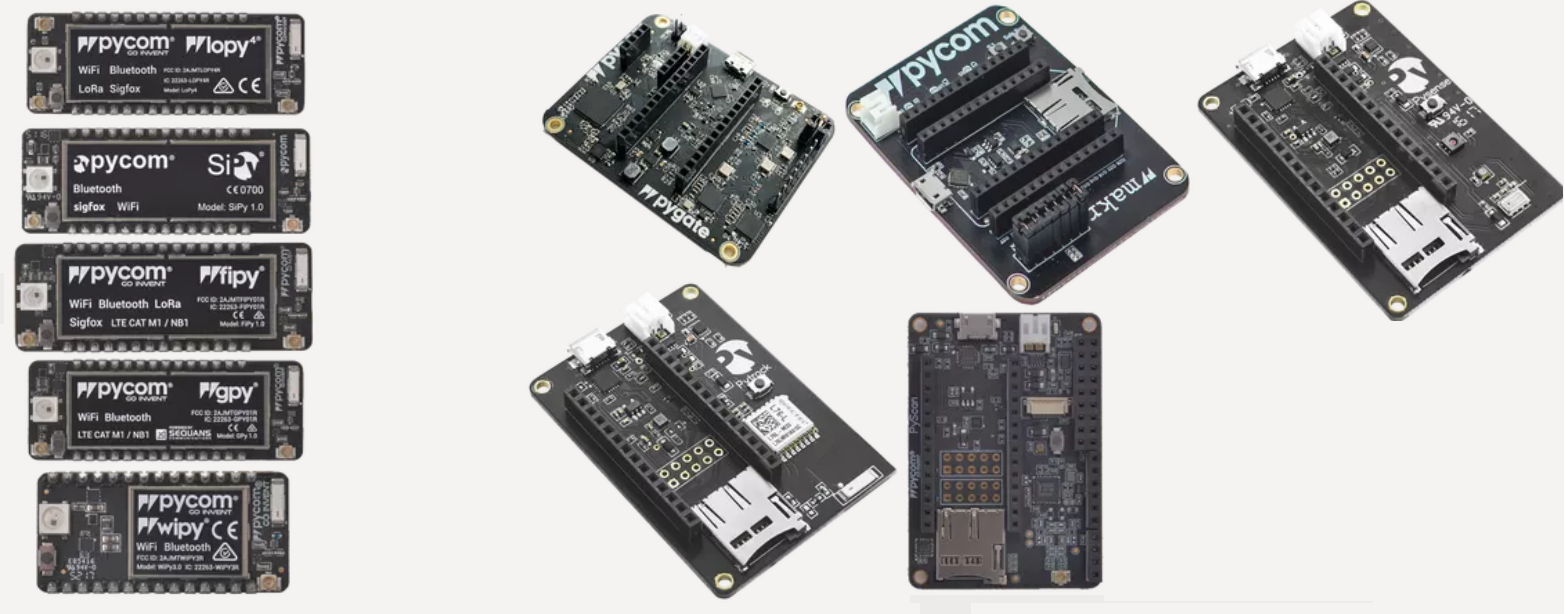
Pycom is my preferred choice. There is a range of devices with a combination of network communication methods as well as a range of plug in boards for sensing, scanning or tracking. The software development environment is good and there is local supply

Example 11 IoT Device, will configure a device to take a real world sensor value and create a message to a MQTT hub and onward to a function, visualisation and storage.


Courage is what it takes to stand up and speak; Courage is also what it takes to sit down and listen. :- W Churchill

Industry 4.0 prototyping, 10 Audio notifications

Integrating audio controls into Industry 4.0 solutions enables additional value to be captured by

  • improving working conditions.
  • communicate issues/problems using audio notifications.
  • eliminate personal radios, losses from setup time, channel and volume conflicts.
  • improved time management of breaks.
  • increased accuracy of business data collection systems such as Andon and OEE.

Remember to get a license to ensure that copyright is respected, expect $2 per FTE per year in Australia, link.

This example will have the team create an internet radio with audio notifications from Andon, Quality, Downtime and Time Management tools. The example exceeds a Minimum Viable Product and masters the control of audio with fade in/out and a radio/notification timetable. The example extends the team to use

  • Direct Stream Radio links
  • MP3 audio notifications
  • SQL database of preset radio, notification and volume presets
  • Excel interface to the SQL database to manage the presets
  • Android Tablet display of radio and notifications
  • Android App for supervisor controls of volume and mute

The resources link provides a guide to creating the Edge Computer solution and the related Android apps for this example 10 Audio solution.

Those who cannot remember the past are condemned to repeat it :- George Santayana

Industry 4.0 prototyping, 09 Andon Visualisation

Andon is a Lean Engineering term referring to a system to notify management, maintenance, and other team members of an issue.

This example has the team use the Edge Computer that was setup in example 05 to create an Andon Visualisation.

The team will use a User Story table to define the Minimum Viable Product configuration for the first Andon Visualisation, using by using Node-Red only to simplify the task.

The next version requires the use of Node-Red, the SQL database and the MQTT message broker to provide full functionality.

The Andon has a simple User Interface so the operator can start and complete the Andon Request. The Request is sent as a MQTT message to other dashboards/android apps where the Request can be accepted. The Request Acceptance, the timing of the Request Acceptance and Request completion have performance standards which are indicated by Green/Yellow/Red indicators. The performance of the system is recorded and able to be exported to Excel for review.

The completed example represents quite a challenge and is exactly the place many teams might stop, this resource link for example 09 and some extra help (on request) are what i trust will make a difference to their ongoing efforts.

Great minds discuss ideas, Average minds discuss events, Small minds discuss people. :- Eleanor Roosevelt

Industry 4.0 prototyping, 08 Android Barcode App

This example will get the team to create an Android barcode scanning app for the simple tablet recommended in the resource list. While dedicated Barcode readers from TCL , Zebra and others are great for full time scanning operators, simple Android tablets or phones are OK for the rest of us.

The app has a button to start continuously scanning for a QR code, once scanned the app reads the code, uses some logic from the QR code and displays the scanned information according to the logic.

The app will be further modified in an future example to do something more useful.

The resources link for example 08 provides a guide to creating an Android App using XAMARIN in Microsoft Visual Studio, the guide, the full app folder and a completed .apk file is provided to assist. There are bound to be issues with the Visual Studio configuration or code, get the team to message me for a hand after they have tried to help themselves.

Don’t quit, suffer now and live the rest of your life as a champion :- Muhammad Ali

Industry 4.0 prototyping, 07 RFID labels

Passive RFID labels also have an important role in the identification and scanning of materials because of their ability to be read remotely and quickly, but a higher cost per label.

RFID labels have aerials to adsorb radio wave energy to power the chip to send information back. The larger the aerial the larger the distance, expect 7m reads from a Zebra TC56 scanner and a 76x76mm SMARTRAC Frog 3D label in real world use.

RFID labels can have a printable surface enabling 2D barcodes and human readable information to be printed, but at a higher cost. This is great practice as RFID enables fast stock checking/stocktaking, 2D barcodes enable transaction scanning for accurate processing and Human readable information allows for problem solving of issues.

The RFID scanners can be 1500+$ each so are not the first tools for prototyping, we will use QR barcodes and Bluetooth tags in the first solutions we prototype. A RFID scanning Android app is available in a later example.

The earth has its music for those who will listen :- Reginald Holmes

Industry 4.0 prototyping, 06 Barcode labels

Barcode labels play a significant role in the identification and scanning of materials because of their interoperability, human readability and low cost.

This example has the team understanding bar-code functionality in an Excel worksheet to print QR barcode labels.

The team can adapt the code for other uses.

The worksheet allows the user to select a job number from a list, a request is made to create a QR code from a Google API. The returned image of a QR code is placed on the work sheet and used to print the label.

The team can modify the sheets to create other lists/labels or adapt the code to use in dedicated apps link to their data to produce labels.

The resources link provides a guide to the barcode example.

A smooth sea never made a skilled sailor :- Franklin D Roosevelt

Industry 4.0 prototyping, 05 Edge Computing

The resources link provides a guide to configuring an edge computer, the foundation block the teams Industry 4.0 prototype. This will provide a messaging service for IoT and Android devices, rules functionality, a SQL database and a dash board for visualisations.

Edge computing has the advantage of reduced latency and lower transmission costs while Cloud computing has the advantage of easier configuration and scalability.

This configuration is a tangible and rewarding task for the team, it will drive ownership, satisfaction and understanding.

The hardware and software have been selected to minimise the complexity of the task to ensure that forum/help information from everybody else attempting the same task is applicable.

“A flower does not think of competing to the flower next to it. It just blooms.”
― Zen Shin

Industry 4.0 prototyping, 04 Securing Azure Mobile App

Securing Azure Mobile App service

The resources link provides a guide to securing the teams own Azure Mobile App from example 03.

The configuration of security can be frustrating, the example uses a simple Azure ToDo demo app to minimise the complexity and to ensure that forum/help information from everybody else attempting the same task is applicable.

Do not skip implementing security at this early stage, mastering security now will ensure a solid foundation for all future work.

Azure security offers four Authentication/Authorisation services.

  • Azure active directory
  • Facebook
  • Google
  • Twitter
  • Microsoft Account

When a user wants to Authenticate, the android app will suspend its current activity and go off to one of these services for an authentication process. If successful, the android app will receive a notification about the user name and some approval to proceed.

The android app does not have to maintain username/password information, this is managed by the authentication service(s).

The android app will have to maintain username rights, above the default, as any valid Facebook user could be authenticated, but that does not mean you want them to have admin rights inside your app.

Nothing will work unless you do – MAYA ANGELOU

Industry 4.0 prototyping, 03 Azure Mobile App

The resources link provides a guide to setup the teams own Azure Mobile App to connect to the Azure Mobile App service setup in example 02.

The Mobile App service will be further configured, and an app created to enable connection the newly created tables. This example will

  • use Azure login details
  • use quick-start to create an Android mobile app
  • deploy the app using Visual Studio, configuration link
  • configure server security to allow easy access, example 04 will configure Azure for restricted access

When the will is ready the feet are light – Proverb