Industry 4.0 prototyping, Value Capture: production

This example will use the Deloitte model for Value Capture with a real world improvement project.

A welding production cell cycle time was determined by the labour rather than the equipment, the cell could operate with different manning levels, 2, 4, 5, 6, 7 or 8 persons to provide different levels of output with different levels of efficiency and cost. Good ergonomic practice had roles rotating every 90 minutes.

Management wanted to

  • reduce the complexity of running the cell, making the team autonomous or at least only requiring a junior supervisor
  • improve efficiency, unit labour cost
  • improve output reliability
  • increase confidence in operating the cell at varying labour levels, enabling labour to be transferred to other cells during shortages without unexpected output reduction/variation.

Management appointed an improvement team to undertake an improvement event using a Lean Engineering methodology from a specialist provider, link. The multi-disciplined team reviewed the cell, the current data and issues lists to propose a micro team to provide a virtualisation for the cell to be a metronome and show if the cell was ahead or behind of the ideal cycle time for each cycle.

The micro team implemented the following infrastructure chart

Infrastructure chart, AoB- Ahead or Behind display for welding cell

The sensor detected existing switch poles to record cycle finish and scrap. The information was recorded as an XML file with other information in a SQL database. A computer read the database at a high frequency and displayed a bar chart of last 20 cycles. Cycles that were close to the ideal time were green, otherwise yellow.

Those familiar with Lean Engineering would recognise the project focusing on the R (Rate) component of the OEE measurement OEE=AxQxR, link, visualising the micro losses that occur from the Ideal Rate.

Key outcomes over the 1500 cycles per shift

  • 10+% increase in efficiency, labour cost
  • improved output reliability
  • reduced complexity
  • improved operator satisfaction
  • improved visibility of issues to attract attention of supervision

The Value Capture step summary is as follows

  • Create, the improvement team investigated the current state, proposed a solution to be evaluated and implemented
  • Communicate, the sensor/SQL table and visualisation provided the information to the cell and supervision
  • Aggregate, every cycle was displayed to operators, every day,
  • Analyse, management and supervision stopped to discuss issues at the cell to support the team, the team consciously/subconsciously reviewed each other’s performance.
  • Act, an issues list of actions to reduce performance variation resulted in targeted fixes, supervision stopped more frequently to assist to correct issues and communicate that output would change, the team self-policed their performance.


Unless commitment is made, there are only promises and hopes; but no plans.
― Peter F. Drucker

Industry 4.0 prototyping, Value Capture

There is a question about Value Capture rather than how to prototype so lets include a post or two on Value Capture in coming weeks.

Value Capture describes achieving some benefit from Industry 4.0 activities, Deloitte describe Value Capture as having stages


Deloitte University Press, link

Get your team to think of it as a PDCA model (Plan Do Check Act) from Lean Engineering and Quality control disciplines if they are familiar with this instead.

The model shows the mix of hard and soft skills that are needed, hence the requirement to have a mix of talent in a team, link. The model describes value capture as using a sensor to measure, communicating the measurement, aggregating/repeating the measurement many times over, analysing/visualising the measurements and acting.

REMINDER: Expect that the value captured often benefits a different part of the chain, don’t be sad or surprised. Get an agreement to share the value or just confirm that this is OK e.g. production uses a sensor to improve control of a process enabling lower quality raw materials to be adequately processed.

  • small benefit it to production team of reduced downtime to reject material
  • big benefit to the supplier thru lower rejection rates/quality costs
  • big benefit to sales by removing possible volume supply constraint.

The best way out is always through.― Robert Frost

Industry 4.0 prototyping, 02 Azure Mobile App Service setup.

The resources link provides a guide to setup the teams own Azure Mobile App Service.

The Mobile App service will be further configured, and an app created to enable connection in subsequent examples. This example will

  • create and use Azure login details
  • use quick-start to create a mobile app service
  • configure server to Australasia region

Barbecue may not be the road to world peace, but it’s a start. -Anthony Bourdain

Industry 4.0 prototyping, 01 Azure connection example

Azure mobile data connection

The examples will provide the prototype team with a minimum number of challenges per example. The examples will become a chassis for the team’s own use.

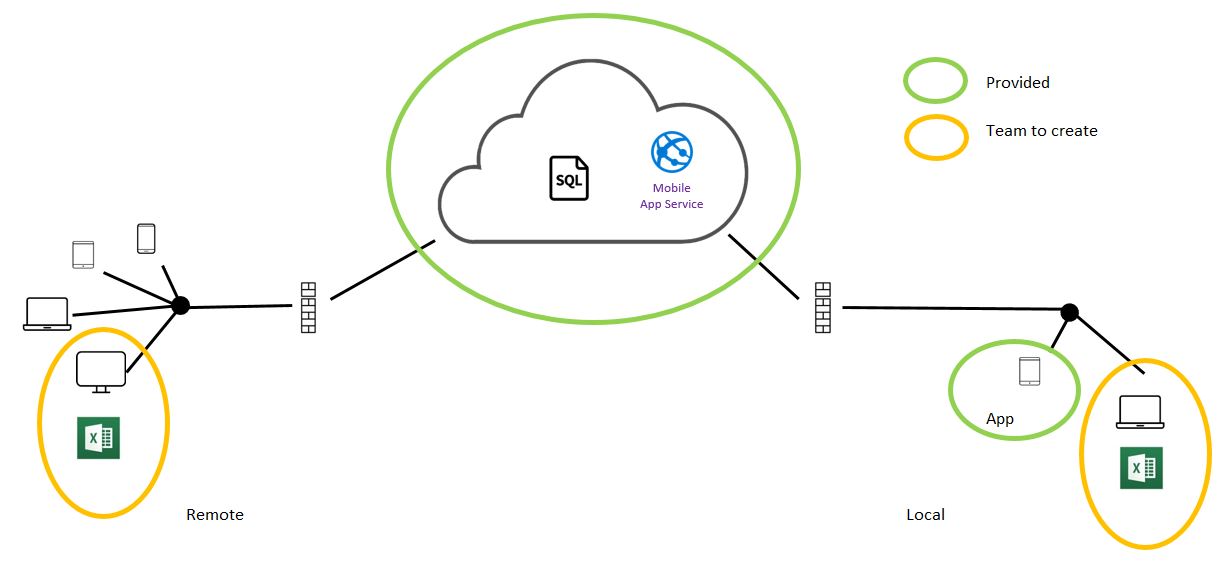
The example resources link provides an app to be side loaded to the android tablet or device. The app creates tasks for a Todo list that is stored in a model app service SQL database. Team will

  • create a connection in excel to the SQL server database
  • explore the database to locate the TodoItem table
  • insert the table into a excel sheet
  • create additional tasks using the app and refresh excel to show the results
  • test the same excel sheet from outside the local LAN

For ease of use the app and SQL table do not require a user ID and requests will be accepted from any IP address , security and restrictions will be added in subsequent examples.

Industry 4.0 prototyping, 00 examples

These examples assume you are seeking some logic or structure to Industry 4.0 prototyping e.g. a leader wanting to understand and increase knowledge as the team progresses, a coder transitioning from another sector. If you just want to blast away then there are lots of places to start that journey from, link.

The examples will have the team mastering one or more key tasks, a connection, a data transfer, a data processing function and a visualisation building to a complete infrastructure diagram capability.

The examples will focus the team on the task at hand, offer further information and guidance resources and a email/forum to ask for further assistance. It is not the intention of this blog to do a team’s homework, rather to provide just enough help those who are willing.

  • 01, Connect from excel to pre-configured Azure Mobile Service table
  • 02, Configure Azure Mobile App service
  • 03, Configure Android App to use Azure Mobile Service
  • 04, Configure Azure security
  • 05, Configure Pycom IoT device, temperature measurement
  • 06-09, Configure Losant IoT Hub, add Pycom devices, connect devices to real world, add Losant functions and visualisations.
  • 10~14, Configure Raspberry Pi, add MQTT message hub, Node RED IoT hub, add devices, add Grafana visualisations.
  • 15~16, Zebra RFD 8500 RFID scanner development.
  • 17~20, Location positioning, WAN WiFi, GPS, Indoor Positioning WiFi/Bluetooth.

“Opportunity is missed by most people because it is dressed in overalls and looks like work.”
— Thomas Edison

Industry 4.0 prototyping, apps and user Interfaces

Production apps and user interfaces are beyond the scope of this blog. Your production supplier will take responsibility for the reliability and usability required for production environments.

Prototype app and user interfaces will adequately manage the security, data and visualisations without regard to user device compatibility and optimising the user experience. Prototyping effort will be focused on improving the team’s/company’s confidence that value can be identified and captured using Industry 4.0 principles.

The Apps will use a standard Xamarin schema for single page, multiple page applications with basic controls and list views.

The user interfaces with include excel workbooks with links to data tables to receive, process and send information. The user interfaces will also include a number of visualisations to demonstrate graphs, meters, location and heat maps using Node Red and Grafana dashboard systems


Be the flame, not the moth. ― Giacomo Casanova

Industry 4.0 prototyping, devices

Prototyping is intended to improve the execution of production projects by increasing the confidence of the team/company with the principles and terminology of Industry 4.0 . These selected devices are focused on achieving these objectives.

  • Android Tablet,
  • Raspberry Pi, Mini PC/IoT device
  • ESP8266, IoT device
  • ESP32, IoT device
  • ESP32 expansion boards, Connectivity, Sensors, Location
  • BLE beacon, Location

Local supplier, specification and pricing information is available in this resource, link

The simple Android tablet will demonstrate the User Interface (UI) for authorisation, connectivity, data entry, actions, 2D barcode scanning, peripherals connection/action, offline data and data visualisations.

The Raspberry Pi will demonstrate Edge computing, using functions to process data locally. The device will host several IoT hub utilities to manage the messaging, data storage, data function and data visualisations. This prototyping will promote the teams understanding and confidence to move to prototype in Cloud IoT hubs and to work with suppliers of the production version.

The ESP8266 and ESP32 chips by Expressif have delivered production quality power and connectivity to prototyping. The chipsets are sold to many suppliers, some of which mount them in a format suited for prototyping with a USB connection, Li-Po battery and buttons.

The ESP8266 development board recommend is in wide use with many examples to support prototyping beyond the scope of this blog. The blog will use one of the many programming languages that can be mounted on the device, Arduino.

The ESP32 development board recommended is a production quality device with expansion boards for sensing, location and scanning. The device quality and tight integration of the expansion boards will reduce the complexity of the advanced prototyping covered by this blog.
Of the many programming languages that can be mounted on the device, MicroPython will be used.


Everyone thinks of changing the world, but no one thinks of changing himself. -Leo Tolstoy

Industry 4.0 Prototyping, messages

Industry 4.0 is about

  • digitising the real world as data,
  • managing that data as the single source of truth,
  • implementing functions to process the data,
  • providing visualisations of the data

Some understanding of the message types used in this process is helpful during prototyping, there are many satisfactory alternatives to these listed which are beyond the scope of this blog

  • MQTT, Message Queuing Telemetry Transport, typically small messages able to be sent and received with low power consumption, low device overhead and at a high frequency.
  • HTTP/HTTPS, Hypertext Transfer Protocol Secure, typically larger messages to send and receive data, often requires larger device power consumption, higher device overhead and frequency of messaging requires management to ensure level of service is maintained.

An IoT device that needs to report temperature frequently can send a small message using MQTT. The message will be received by the MQTT Hub which may have ‘000’s, to manage per second. Complex distribution of the message to easy to enable.

A user that needs the history of recent temperatures can send a message using Https. The message request will be received by a server, the data prepared from the storage location and the larger data set sent back as a reply message.

This oversimplified view of messages will be corrected as your understanding improves, you make decisions with your prototyping and use some examples, for now MQTT is for smaller messages, Https is for larger messages.


Those who live by the sea can hardly form a single thought of which the sea would not be part. 
― Hermann Broch

Industry 4.0 Prototyping, development software

The following software systems are recommended for Industry 4 prototyping, there are many alternatives that are satisfactory and are beyond the scope of this blog.

  • Integrated Development Environment (IDE) to create and manage software for Android Apps. The recommended IDE is Visual Studio Community Edition by Microsoft. The installation will include Xamarin to enable programming of Android Apps, IoT Devices and to access plugins to reduce the complexity of tasks such as Bluetooth, 2D barcode scanning, RFID scanning. The installation will include Android Software Development Kit (SDK) and Tools for Android device programming.
  • Java software to enable utility programs used in testing and development. The recommendation is Node.JS.
  • Dropbox, File sharing platform to enable sharing of examples, link.
  • TeamViewer, PC to PC sharing software to enable remote login for assistance.
  • MQTT, a utility software to assist with MQTT message setup between device, Android devices, the cloud and PC’s.
  • Node Red, IoT hub software
  • Postman, a utility software to assist with Http/Https message setup between device, Android devices, the cloud and PC’s.
  • RealVNC, a utility software to assist to remotely login to devices and PC’s for setup and management.

The links to resources are at this page, link


We know only too well that what we are doing is nothing more than a drop in the ocean. But if the drop were not there, the ocean would be missing something.― Mother Teresa